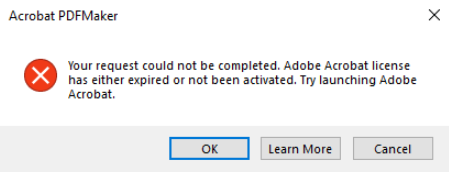
Problem: While working with PDFs in Adobe Acrobat you receive an error, like in the image below, stating that my Adobe Acrobat license has expired or not been activated.
Solution:
- Select the cancel button in the error message on your screen
- Close all your PDF documents that you have open on your computer
- Click the Adobe Acrobat icon located on your desktop
By following these steps above you will re-establish the connection back to Adobe Acrobat. If this did not fix your problem, please look through our library for other articles of relevance or submit a helpdesk ticket.